AuditDesktop le permite hacer copias de sus compromisos de auditoría. El
Nota de la interacción recién copiada mostrará que se trata de un
copia, junto con la fecha y hora de su creación. Esta nota puede ser
modificado más adelante si es necesario.
Para copiar una interacción, siga estos pasos:
-
En la auditoría activa, abra el archivo Hogar y haga clic en el botón
Todo botón. -
Seleccione la interacción y haga clic en
 Copiar botón.
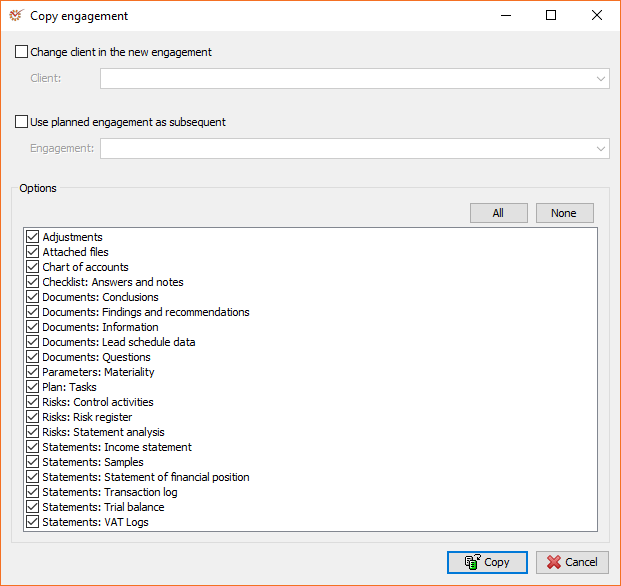
Al copiar, puede cambiar los siguientes parámetros:
- Cambiar de cliente en el nuevo compromiso - crea una nueva copia de la carpeta
compromiso existente para otro cliente seleccionado. La combinación de
Esta opción y las opciones de copia de datos, le permite utilizar el comando
método de participación que ha modificado con otros métodos similares
Compromisos. - Utilizar la interacción planificada como posterior - Copia los datos de un archivo
compromiso existente a uno planificado. Esto es posible porque
Los enfrentamientos planificados no tienen un método cargado y, por lo tanto,
Pueden utilizar otros datos de interacción.
Consejo | Ejemplo de uso de interacciones planificadas durante la copia
Puede utilizar la función Utilizar la interacción planificada como posterior opción cuando
Desea realizar auditorías intermedias para algunos clientes. Por lo tanto, puede crear
su primera auditoría como un encargo, y el resto según lo planeado. Cuando usted
Complete una auditoría determinada, puede copiarla y seleccionar la siguiente.
De esta forma, todos los datos de la auditoría anterior serán transferidos a la
nuevo.
Opciones
En esta sección puede seleccionar qué datos se copiarán en el nuevo
compromiso. Si marca una opción, sus datos se copiarán, mientras que si
Si lo desmarcas, se omitirán los datos.
| Option | Description |
|---|---|
| Attached files | All files attached to documents, questions, or steps. |
| Chart of accounts | Entered chart of accounts. It affects the trial balance and the misstatements in accounts. |
| Checklist: Answers and notes | Answers to questions and their attached notes in checklists. |
| Documents: Conclusions | Conclusions entered in documents. |
| Documents: Findings and recommendations | Findings and recommendations entered in documents. |
| Documents: Information | Entered information (comments, procedures applied, etc.). |
| Documents: Lead Schedule data | Data entered in Lead schedule when using spreadsheet. |
| Documents: Questions | Entered questions to the client, the team, from a previous or subsequent engagement. |
| Adjustments | All identified adjustments and adjusting journal entries. |
| Parameters: Materiality | The determined materiality for the engagement. |
| Plan: Tasks | Tasks connected with the specific engagement. |
| Risks: Control activities | Entered control activities. |
| Risks: Risk register | Identified risks. |
| Risks: Statement analysis | Selected material items. |
| Statements: Income statement | Entered income statement(initial and final). |
| Statements: Samples | Statementsamples. |
| Statements: Statement of financial position | Entered statement of financial position (initial and final). |
| Statements: Transaction log | Transaction log and its samples (depends on the Samples option). |
| Statements: Trial balance | Entered trial balances. |
| Statements: VAT logs | Purchase log, Sale log, and Documents as well as their samples (depends on the Samples option). |
Para ahorrar tiempo y esfuerzo, puedes utilizar estos dos botones:
- Todo - Marca todas las opciones
- Ninguno - Desmarca todas las opciones
- Una vez que esté listo, haga clic en
Copiar con el fin de copiar el
Compromiso seleccionado.