The Findings and recommendations window can be accessed in one of
the following ways:
- Open the engagement → Select the working paper → Click the
 Findings
button located in the toolbar - Open the engagement → Right click on the working paper to open the
context menu → Select
Findings and
Recommendations
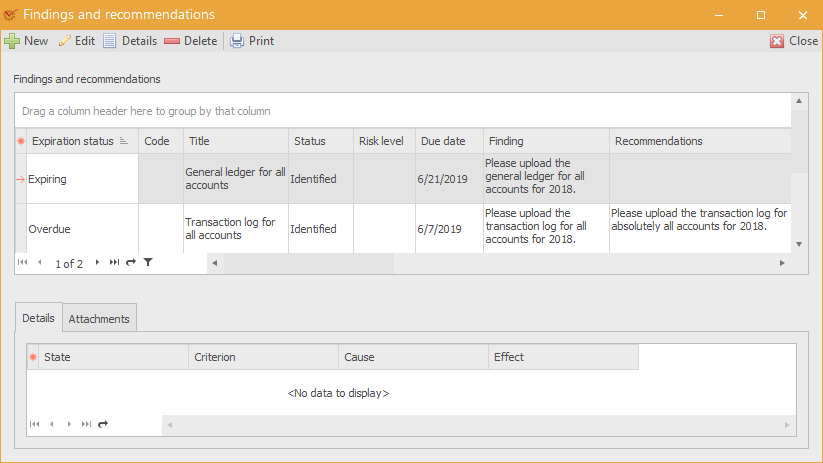
All findings added in the working papers of an engagement can be viewed
in the Findings and Recommendations
Report.
 New – open
the window for adding a new finding Edit – open
the window for editing findings Details – view details
about the selected finding Delete – delete the
selected finding Print – open the window
for printing templates
If you right click on a blank space in the table, you will open a
context menu that contains all actions described above.
Columns FindingsandRecommendations1-Columns
The table contains the following columns:
- Expiration status – the finding's status in relation to its due
date**
** - Code – the finding's code**
** - Title – the title of the finding**
** - Status – the status of the finding **
** - Risk level – the level of the identified risk (Low, Medium,
High) - Due date – the due date until which corrective measures should
be taken**
** - Finding – the whole text of the finding
- Recommendations – the recommendations given to the client
- Reviewer's comment – comment made by the reviewer**
** - Conclusion – the text of the reached conclusion**
** - Area manager – the auditee's representative, responsible for
tracking the implementation of the recommendations by the client - Responsible person – the person who will implement the
recommendations - Corrective measures – the corrective measures that are taken
- Auditee's comment – the comments made by the audited entity**
** - Requested due date – the requested new due date**
** - Process name – the process affected by the finding**
** - Subsidiary – what the finding refers to**
** - Area manager's response – the response of the area manager**
** - Visible in web system – whether the finding will be visible in
the web system**
**
Details FindingsandRecommendations1-Details
The tab shows details about each finding with regard to these
parameters:
- State – the state that was established**
** - Criterion – the criterion used for the cause and effect
assessment**
** - Cause – the cause of the respective finding**
** - Effect – the effect of the respective finding
Attachments FindingsandRecommendations1-Attachments
The tab shows all files that are attached to the findings in the web
system. You can also attach a new file – to do so, right click within
the Attachments field. From the context menu, select
Attach.
Other Information FindingsandRecommendations1-OtherInformation
Data description fields
Template fields FindingsandRecommendations1-Templatefields
In addition to common data, specific fields are
also used in template description.
Data relation FindingsandRecommendations1-Datarelation
[Findings]1 — *[Details]
Findings FindingsandRecommendations1-Findings
Name: fbdsAscertainments
Name |
Label |
|---|---|
ASCERTAINMENT |
Finding |
ASCERTAINMENT_IN_REPORT |
Finding (In Report) |
ASCERTAINMENT_RISK_LEVEL |
Risk level |
AUDITEE_COMMENT |
Auditee's comment |
AUDITEE_COMMENT_IN_REPORT |
Auditee's comment (In Report) |
AUDITEE_STRUCTURE_ID |
Auditee structure ID |
AUDITEE_STRUCTURE_NAME |
Auditee structure name |
CONCLUSION |
Conclusion |
CONCLUSION_IN_REPORT |
Conclusion (In Report) |
CONTROLLER_COMMENT |
Reviewer's comment |
CONTROLLER_COMMENT_IN_REPORT |
Reviewer's comment (In Report) |
DEADLINE_DATE |
Deadline date |
PROCESS_ID |
Process ID |
PROCESS_NAME |
Process name |
RECOMMENDATIONS |
Recommendations |
RECOMMENDATIONS_IN_REPORT |
Recommendations (In Report) |
RESPONSIBLE_PERSON_ID |
Responsible person ID |
RESPONSIBLE_PERSON_NAME |
Responsible person name |
RiskLevel |
Risk level |
SUBSIDIARY_ID |
Subsidiary ID |
SUBSIDIARY_NAME |
Subsidiary name |
Details FindingsandRecommendations1-Details.1
Name: fbdsDetails
| Name | Label |
|---|---|
| ASCERT_CRITERION | Criterion |
| ASCERT_EFFECT | Effect |
| ASCERT_REASON | Cause |
| ASCERT_STATE | State |