AuditDesktop supports a Risk register of all identified
risks. To access it, open the Risks tab and click the Risk
register button.
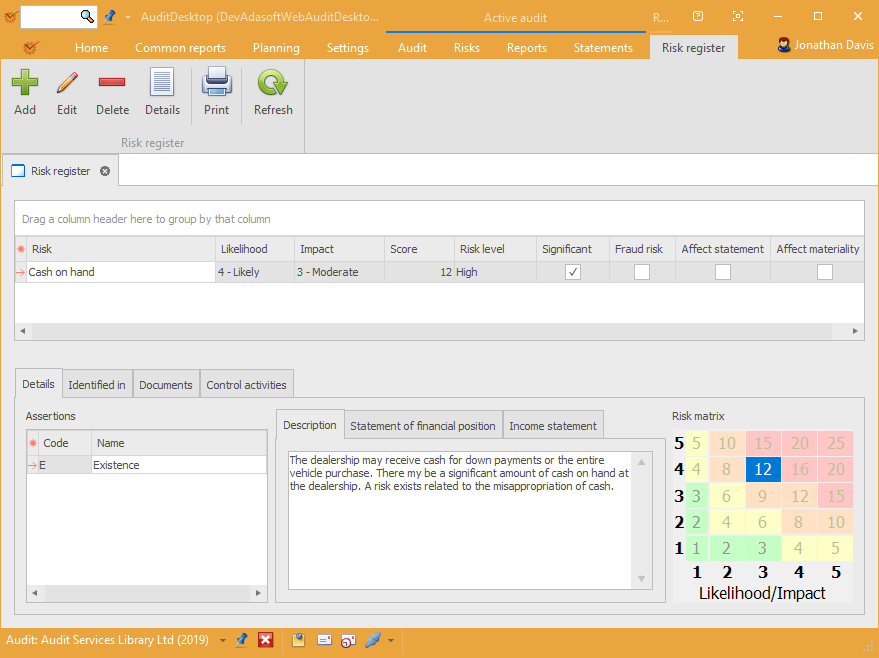
The buttons enable you to perform the following actions:
- **
 Add **– add a new risk
- **
 Edit **– edit
risk details - **
 Delete **– delete the
selected risk  **Details **– view risk
details (add and edit functions are inactive)- **
 Print **– open the window
for preview and printing of templates - **
 Refresh **– refresh table
data
Tip
Right click in the table to open the context menu that gives access to
the actions described above (Refresh excluded). They can also be
accessed from the Risk matrix, Income statement
analysis, Statement of financial position
analysis, and Working
paper.
Details
- Assertions – shows which management assertions are affected by
the risk. - Description – a detailed description of the identified risk.
- Statement of financial position – shows the statement of
financial position items
affected by the risk. - Income statement – shows the income statement
items affected by the risk. - Risk matrix – the risk level of the identified risk
automatically assessed by the program.
Identified in
The tab shows the working paper that the risk is identified in.
Documents
The tab shows all documents and procedures that are activated by the
risk (this must be set up beforehand in edit engagement
method).
Control activities
The tab shows information about the identified control activities and
whether they affect the entire statement.
Additional Information
Template description fields
Template fields
In addition to common data templates, specific
fields are also used in template description.