How to Identify a Risk from a Working Paper
- Select the working paper and do one of the following actions:
- Right click on the working paper and from the context
menu select Identified risks - Click the Identified risks button located on the toolbar
- Click Add risk.
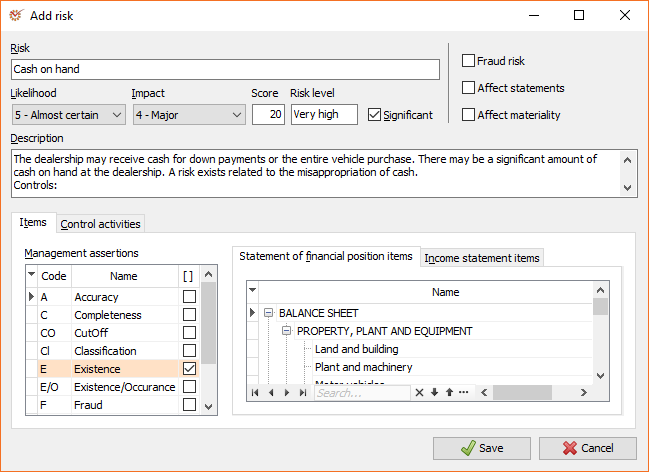
-
Enter a short description of the identified risk in the Risk
field. -
By default, the Likelihood and Impact options are set to
0-Undefined. It's not obligatory to select their values in initial
risk identification. When you select the values, AuditDesktop will
automatically assess the Risk level. -
Mark whether the risk is Significant or not. If you set a
High or Very high risk level, the program will automatically
mark it as Significant. Uncheck the box if you do not wish the risk
to be marked as such.
Info
The Fraud risk option carries only informational purpose for now.
-
In the Affect statements box, mark whether the risk affects the
entire statement, i.e. all statement items. -
In the Affect materiality box, mark whether the risk affects the
determining of
materiality. -
Enter a more detailed description of the identified risk in the
Description field (optional). -
In the Items section, select which Management assertions are
affected by the risk and mark the respective Statement of financial
position and Income statement items. -
In the Control activities section, select the control
activities, if any. Define whether the specified control activity
affects the entire statement. -
Click the Save button.