Add an Event
To schedule a new event you can select one of the following
ways:
- Click the New Event button located in the toolbar
- Double click in any time block or in the specific time block where
you want to schedule the new event - Make a right click and select New Event from the context
menu
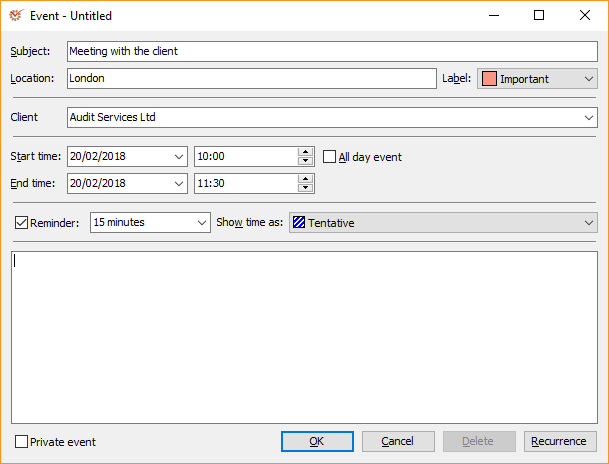
The fields in the dialog window are as follows:
- Subject - the subject of the planned event
- Location - the location where the event will take place
- Label - select a label for the new event
- Client - select the client with whom the event is connected (if
any) - Start time and End time - set the event's start and end time
- All day event - mark whether it will be an all-day event
- Reminder - mark whether you wish to be reminded in advance about
the upcoming event - Show time as - select user's availablity status (Free,
Tentative, Busy, Out of office) - Private event - mark if the new event is of private nature
- Recurrence - open the window for scheduling recurring events
(displayed by the
 icon)
Add a Recurring Event
- Open the Event recurrence window in one of these ways:
- Open the Event window → Click the Recurrence button at the
right corner of the window - Click the New Recurring Event button in the toolbar
- Right click in the scheduler and select the New Recurring Event
option from the context menu
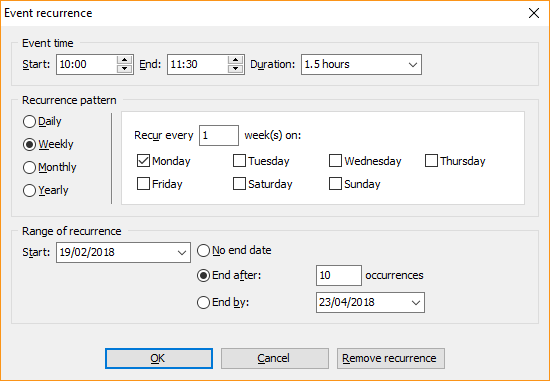
-
You can set the Start, End and Duration of the planned
recurring event. -
Select the Recurrence pattern:
- Daily - the event may occur every week day or at a specific
interval, for example, every third day - Weekly - a weekly recurrence interval at a week day (more than
one day can be marked) - Monthly - a monthly recurrence interval
- Yearly - an yearly recurrence interval
- Fill in the values in the Range of recurrence section:
- Start - the start date of the recurring event
- No end date - the event does not have a specific end date
- End after - the number of ocurrences after which the event will
no longer be in effect - End by - the end date after which the event will no longer be in
effect
- Click OK.
Edit an Event
To edit an already scheduled event, make a right click on it and open
the context menu.
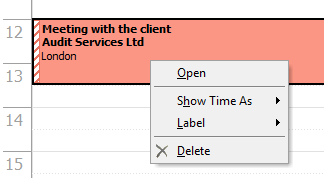
- Open - edit the values entered in the window for adding a new
event - Show Time As - edit the selected user status (Free,
Tentative, Busy, Out of office) - Label - edit the event's selected label
- Delete - delete the scheduled event