The Monetary sample parameters are the following:
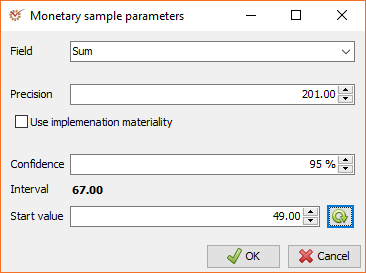
- Field - select the field from the drop-down menu, which will be
used for the sample generation - Precision - the level of precision is the maximum level of
errors in the population that the auditor can accept. As a rule, the
threshold of materiality performance is used for precision. You can
set a different value from the selected materiality,
by unmarking the Use implementation materiality option. - Confidence - the level of confidence determines the level of
residual risk as well as the R-factor - Interval - automatically calculated (Interval =
Precision/R-factor) - Start value - you can either enter it manually or click the
 Random start value button
When you are ready, click OK.
| Confidence | Residual risk | R-factor |
| 99% | 1% | 4.6 |
| 98% | 2% | 3.7 |
| 95% | 5% | 3.0 |
| 90% | 10% | 2.3 |
| 86% | 14% | 2.0 |
| 85% | 15% | 1.9 |
| 80% | 20% | 1.6 |
| 75% | 25% | 1.4 |
| 72% | 28% | 1.3 |
| 70% | 30% | 1.2 |
| 65% | 35% | 1.1 |
| 63% | 37% | 1.0 |
| 60% | 40% | 0.9 |
| 55% | 45% | 0.8 |
| 50% | 50% | 0.7 |