AuditDesktop supports work with Transaction log nomenclature, which
enables you to import the chronological listing of accounting
transactions.
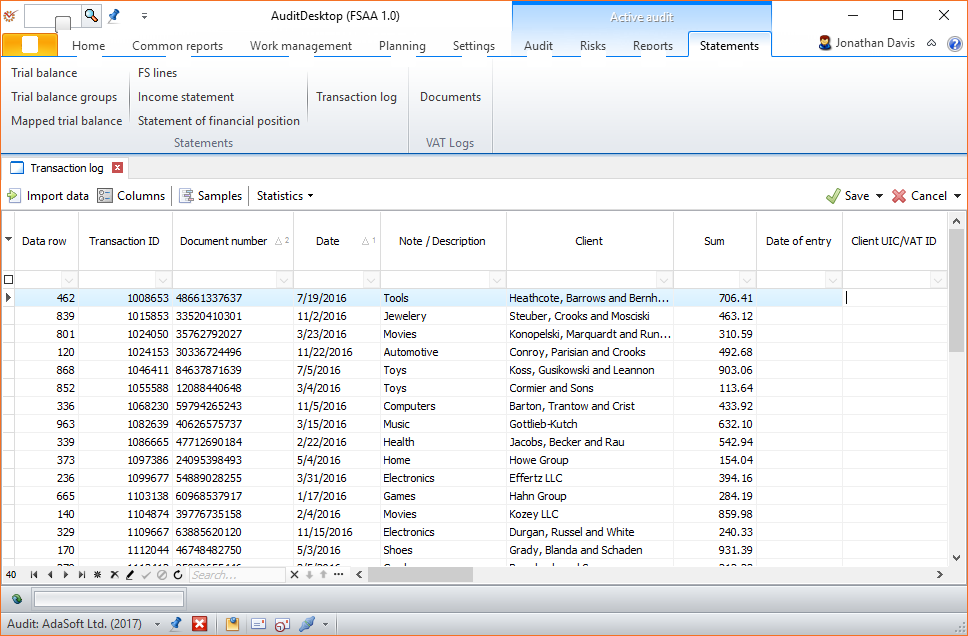
To access it, open the Statements tab in Active audit and click the
Transaction log button.
*
*
 Import
data - select data import specification Columns - select column
visibility. Some options are mutually exclusive; to optimise data
loading and saving speed, hide the columns that you are not
currently using. You can set different column visibility for each
engagement. Samples - open
the Samples module- Statistics - open the Benford's law
analysis for data manipulation
Tip
Another method for importing data is through the Copy & Paste
functions.
When you finish, click  Save to
save your work and close the window. If you want to save your work but
stay in the current window, select
 Apply from the drop-down menu.
The Transaction log window contains the following columns:
- Data row
- Transaction ID
- Document number
- Date
- Date of entry
- Note / Description
- Client
- Client UIC / VAT ID
- Document type
- Document row №
- Account
- Account name
- Debit|Account
- Debit|Account name
- Debit|Batch code
- Debit|Batch
- Debit|Batch 2 code
- Debit|Batch 2
- Debit|Sum
- Credit|Account
- Credit|Account name
- Credit|Batch code
- Credit|Batch 2 code
- Credit|Batch 2
- Credit|Sum
- Sum
- Quantity
- Measure
- Unit price
- File number
- Position in file
- User field|1 Text
- User field|2 Text
- User field|3 Text
- User field|1 Float number
- User field|2 Float number
- User field|3 Float number
- User field|1 Integer number
- User field|2 Integer number
- User field|3 Integer number