The program's Backup function enables you to create a database backup.
In order to create a backup, users do not have to interrupt their work,
you can do so at any time. The Firebird database backup files have a
.fbk extension.
1. Backup launched from server.
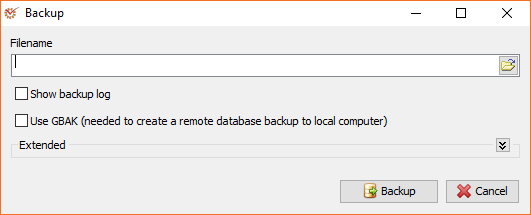
1.1. Enter the filename.
1.2. Mark the available options (optional):
-
- Show backup log - shows the backup process in details
- Use GBAK - uses gbak.exe (from the Firebird package). If
the option is marked, the backup can be recorded on the current
computer regardless of whether the database is remote (on
another server) or not.
1.3. Click
the** Backup** button
and wait for the process to be completed.
2. Backup launched from client instance and backup remaining on server.
2.1. Enter the full path to the file backup (you cannot use the
selection button). The folder where you have set the backup to be
created must be existent and available for database backup process.
Example: C:\AuditDesktop\Backup\backup_before_update.fbk
2.2. If you wish, mark the Show backup log option.
2.3. Make sure that the Use GBAK option is not marked.
2.4. Click the
Backup button
and wait for the process to be completed.
3. Backup launched from client instance and downloading backup on it.
This backup creation method takes considerably more time. A faster
method is to create backup on the server and copy the file from there to
the client instance via the network or by some other means.
3.1. Enter filename (you can use the selection button).
3.2. If you wish, mark the Show backup log option.
3.3. Make sure that the Use GBAK option is marked.
3.4. Click the
Backup button
and wait for the process to be completed.
Extended
The extended options are hidden by default. They are used only when
there are problems with the database or in other special cases.
-
- Non transportable - the default dump file format is
transportable. Transportable backup files are written in a
format known as external data representation (XDR) format and it
is this format which allows a dump taken on a server of one type
to be successfully restored on a server of another type - Metadata only - only backs up metadata (schema). No table data
will be stored. - No garbage collection - prevents Firebird's garbage collection
from taking place while backup is running. Normally backup
program connects to the database as any other connection would
and garbage collection runs normally. Using this option prevents
garbage collection from running during the course of the backup.
This can help speed up the backup. - Ignore checksums - backup program will ignore bad checksums in
the database. This can be used to try to backup a database that
failed due to checksum errors. There is no guarantee that the
data will be usable though, so it is best to take other
precautions to preserve your data. - Convert external tables - any tables, defined as external, will
be backed up as if they were normal (non-external) tables. When
this dump file is used to restore a database, the tables that
were external in the original database will no longer be
external. - Ignore Limbo - If you have a two-phase transaction (across two
different databases) that failed because a server died before
the commit, but after the changes were made, you have a limbo
transaction. This option forces the backup to ignore data from
such broken transactions. It should not be used for normal
backups and only used to try to recover from a failure.
- Non transportable - the default dump file format is