The Message queue shows all messages that are saved to be sent
later. They can be sent manually or automatically by the system if you
are using AdaSoft.Messaging Service.
You can access the queued messages from:
- The Details section of all Send new message
and Send merged messages windows. Only
messages of the respective type will be shown (Clients, Working
papers, etc.).
For example: if you open a message from the Clients window, the
message queue will show only messages queued to be sent later from this
specific location.
- The E-mail queue window accessed through the
 button in the program's main
screen
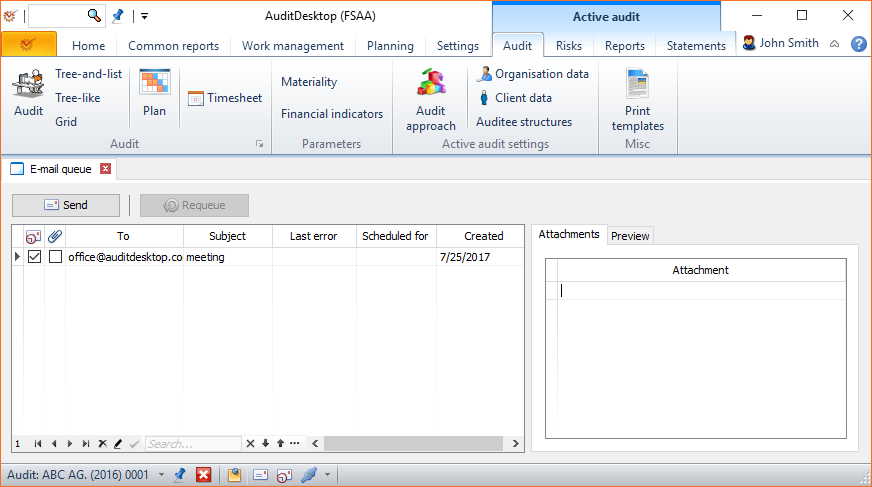
The buttons which help you manage the queued messages are:
- Send - send the active messages (those that have not registered
any errors in previous sending)  Requeue - reset an error
and re-activate the message
Note
If an error occurs during message sending, the message will be
deactivated and information about the error will be displayed in the
Last error field. The message will not be processed until the error
is resolved and it is reactivated through the
Requeue button. The table
also enables you to make corrections to the recipient's E-mail address
in the To field.
The available fields are the following:
- To - the recipient's E-mail address
- Subject - the subject of your message
- Last error - shows if there was an error during previous sending
- Scheduled for - the message is scheduled to be sent
later - Created - date of message creation
- Attachments - the files attached to this message (if any)
- Preview - preview of the text of the message