AuditDesktop enables you to make copies of your audit engagements. The
Note section of the newly copied engagement will show that it is a
copy, along with the date and time of its creation. This note can be
changed later on if necessary.
To copy an engagement, perform the steps:
-
In active audit, open the Home tab and click the
All button. -
Select the engagement and click
 Copy button.
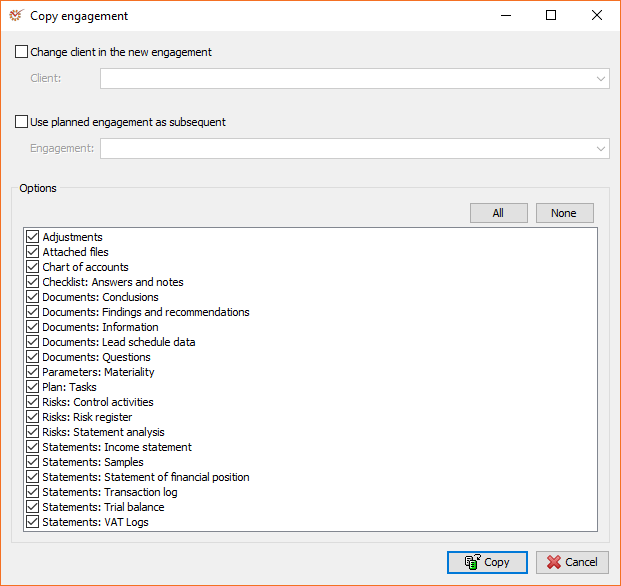
When copying, you can change the following parameters:
- Change client in the new engagement - creates a new copy of the
existing engagement for a selected other client. The combination of
this option and the copy data options, enables you to use the
engagement method that you have modified with other, similar
engagements. - Use planned engagement as subsequent - copies data from an
existing engagement to a planned one. This is possible because
planned engagements do not have a loaded method and subsequently,
they can use other engagement data.
Tip | Example of using planned engagements during copying
You can use the Use planned engagement as subsequent option when you
wish to do intermediate audits for some clients. Thus, you can create
your first audit as an engagement, and the rest as planned. When you
complete a given audit, you can copy it and select the subsequent one.
In this way, all data from the previous audit will be transferred to the
new one.
Options
In this section you can select what data will be copied in the new
engagement. If you mark an option, its data will be copied, whereas if
you unmark it, the data will be skipped.
| Option | Description |
|---|---|
| Attached files | All files attached to documents, questions, or steps. |
| Chart of accounts | Entered chart of accounts. It affects the trial balance and the misstatements in accounts. |
| Checklist: Answers and notes | Answers to questions and their attached notes in checklists. |
| Documents: Conclusions | Conclusions entered in documents. |
| Documents: Findings and recommendations | Findings and recommendations entered in documents. |
| Documents: Information | Entered information (comments, procedures applied, etc.). |
| Documents: Lead Schedule data | Data entered in Lead schedule when using spreadsheet. |
| Documents: Questions | Entered questions to the client, the team, from a previous or subsequent engagement. |
| Adjustments | All identified adjustments and adjusting journal entries. |
| Parameters: Materiality | The determined materiality for the engagement. |
| Plan: Tasks | Tasks connected with the specific engagement. |
| Risks: Control activities | Entered control activities. |
| Risks: Risk register | Identified risks. |
| Risks: Statement analysis | Selected material items. |
| Statements: Income statement | Entered income statement(initial and final). |
| Statements: Samples | Statementsamples. |
| Statements: Statement of financial position | Entered statement of financial position (initial and final). |
| Statements: Transaction log | Transaction log and its samples (depends on the Samples option). |
| Statements: Trial balance | Entered trial balances. |
| Statements: VAT logs | Purchase log, Sale log, and Documents as well as their samples (depends on the Samples option). |
To save time and effort, you can use these two buttons:
- All - marks all options
- None - unmarks all options
- Once you are ready, click
Copy so as to copy the
selected engagement.