Here you can set up the list of trial balance
groups. Each group represents a separate
Initial trial balance. The Initial trial balance of the client that is
being audited is at the basis of the hierarchical list.
You can edit this list from the Trial balance groups window or from
Edit Engagement Approach → Main section →
Trial balance groups.
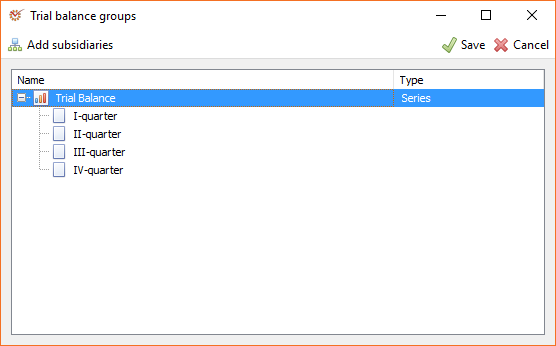
For each trial balance, you can determine the type of its subreports.
Several subreport types are available:
- None - there is no dependency between the separate trial
balances. No checks and warning messages between the parent and
child nodes. - Series - a series of trial balances arranged in a certain order.
It is most often used for consecutive trial balances of one and the
same enterprise. They can be monthly or quarterly. - Subset - a subset of trial balances that constitute separate
parts of the parent one. It is most often used for subsidiaries or
activity types in budget-financed enterprises. - Accumulative - a sequence of trial balances, each including the
values of the previous one. It is most often used for intermediate
audits.
The  Add
subsidiaries button enables you to quickly add a new subsidiary.
You can determine the trial balance type through the context
menu of the parent section.
Trial balance groups are also used when entering Adjustments
(Misstatement, Reclassification or Elimination) so as to
indicate what trial balance the adjustment belongs to.