You can access the Add control activity window from several
positions in the program:
- Working paper → Right click on it or click
 Control activities in the
toolbar → Click Add
- Risks → Click Identifying CA → Click
Add - Risks → Click Preliminary assessment →
ClickAdd
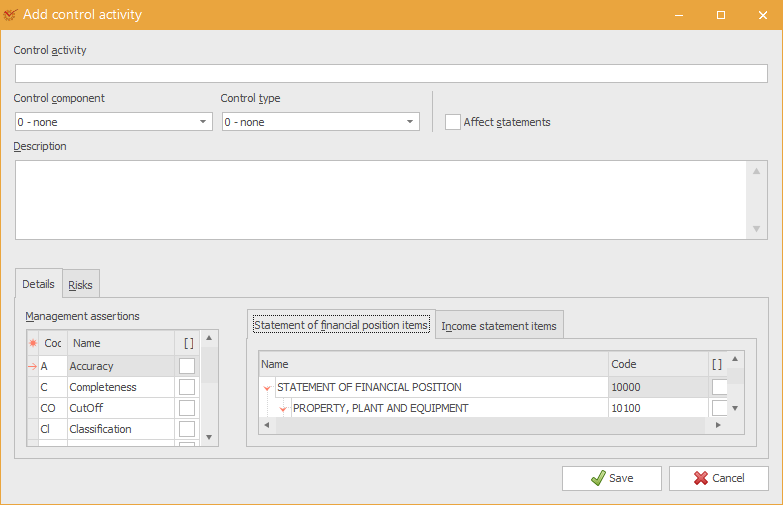
- Control activity – enter the name of the control activity
- Control component – select the control component from the
drop-down menu:- 0-none
- 1-Control environment
- 2-Control activity
- 3-Information system
- 4-Monitoring
- Control type – select the control type from the drop-down menu:
- 0-none
- 1-Preventive
- 2-Detect and Correct
- Affect statements – mark whether the control activity affects
all statement items - Description – you can enter a short description of the control
activity
Details
- Management assertions – mark the management
assertions covered by the control activity - Statement of financial position items – mark the Statement of
financial position items
covered by the control activity - Income statement items – mark the Income statement
items covered by the control activity
Risks
The tab shows information about the risks that are covered by the
control activities.
- Description – a short description of each risk
When you are done, click
 Save.