AuditDesktop supports work with financial statement analysis. It enables
auditors to determine which items are material and whether they will
perform substantive procedures, control tests, or both.
To access the Income statement analysis window, open the Risks
tab and click Income statement.
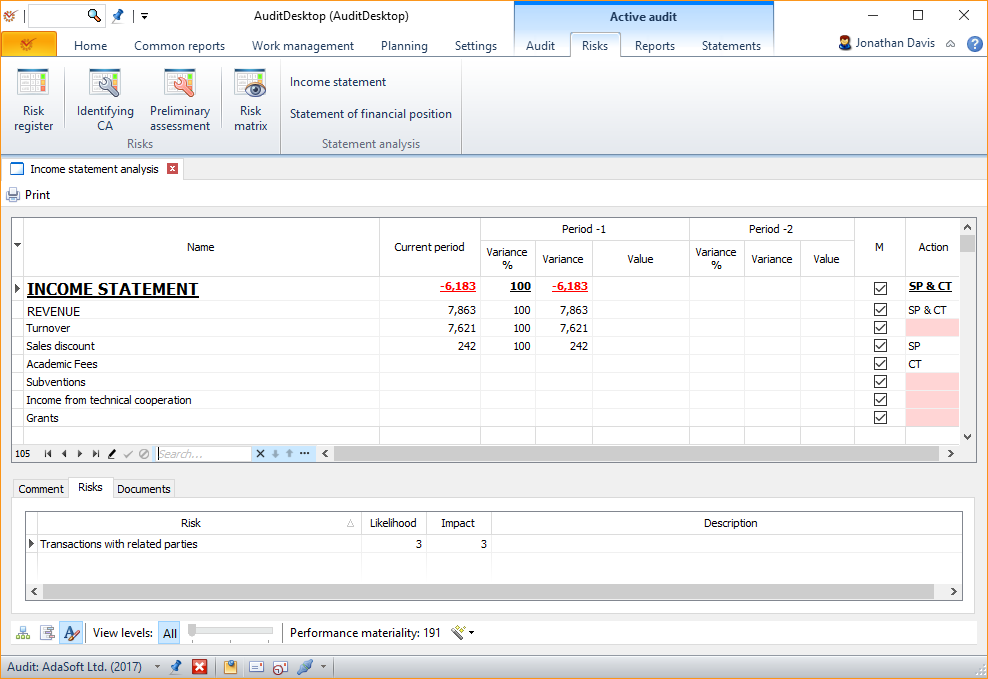
Income statement analysis
- M column – if you want to mark an item as Material
- Action column – select your future actions from the drop-down
menu:- SP – perform substantive procedures
- CT – perform control tests
- SP & CT – perform both substantive procedures and control
tests
When you mark an item as Material, the program will automatically
enter the SP & CT option in the Action column. If the item is
marked as Material, but no future action is chosen, the program will
colour the cell in red.
If you right click in the table, you will open the context
menu. The Add risk option gives access to the window
for adding new risks.
Comment
The tab shows all comments entered for the selected item. You can also
enter your own comments.
Risks
The tab shows all risks identified for the
selected item. If you right click in the tab, you will open a context
menu:
- Add risk – open the window for adding risks
- Edit risk – open the window for editing risks
- Risk details – show the risk details, without edit option
Documents
The tab displays all working papers that are activated with regards to
the identified risks.
Buttons
-
Print – open the window for preview and printing of
templates -
– switch the active window to the tree-like view mode
-
– hide all rows that have no entered values
-
– change the font of statement items and make their names bold
-
View levels: All – all items will be shown. You can use the
slider to determine the visualisation level of statement items. -
Performance materiality – click the button to open the drop-down
menu. Select one of the following options:- **Overall materiality **– all items whose absolute value exceeds
the engagement's overall materiality will be
marked as material - **Performance materiality **– all items whose absolute value
exceeds the performance materiality will be marked as material
- **Overall materiality **– all items whose absolute value exceeds
Other Information
Template description fields
Template fields
In addition to common data, specific fields are
also used in template description.
Statement
Name: mtStatement
| Name | Label |
|---|---|
| ASSERTIONS | Management assertions |
| CONTROL_ACTION | Action |
| CURRENT_VALUE | Current period |
| IS_MATERIAL | Material |
| ITEM_LEVEL | Item Level |
| ITEM_NAME | Name |
| ITEM_NO | Item # |
| ITEM_SHIF | Code |
| NOTE | Comment |
| PARENT_ID | Parent ID |
| PREPREVIOUS_VALUE | Period -2|Value |
| PrePreviousValueVarP | Period -2|Variance % |
| PrePreviousValueVarV | Period -2|Variance |
| PREVIOUS_VALUE | Period -1|Value |
| PreviousValueVarP | Period -1|Variance % |
| PreviousValueVarV | Period -1|Variance |