To be able to edit the Initial statement of financial position,
perform these steps:
-
Open the Statements tab and click Statement of financial
position. -
Open the Initial tab.
-
Click the Editing:Data button.
**
**
Note
If you are using the Financial Statement Audit
Approach(FSAA)
when making corrections, they must be made to items on the child level.
Do not transfer corrections to the parent level!
Items that are displayed in bold have calculation formulas. The values
of the other items are entered manually.
The Import data button opens the window for selecting data import
specifications.
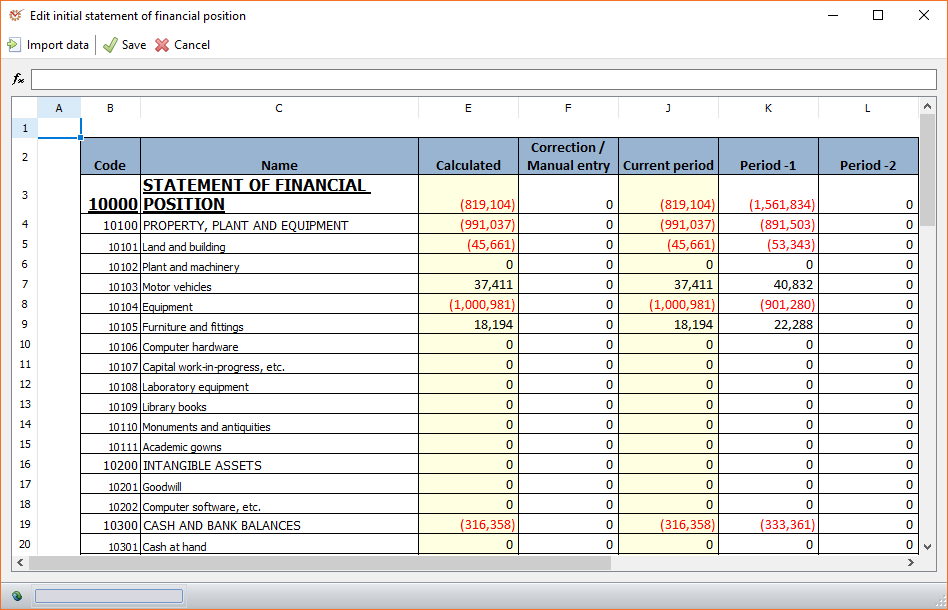
The Edit initial statement of financial position window includes
the columns:
- Code - code of the item
- Name - name of the item
- Calculated - automatically generated sum that depends on the
settings in the Statement of financial position
items nomenclature - Correction / Manual entry - manually added correction to the
calculated value - Current period - common for calculated and added values
- Period-1 - previous to the current period
- Period-2 - period before last
- When you finish editing, click Save.