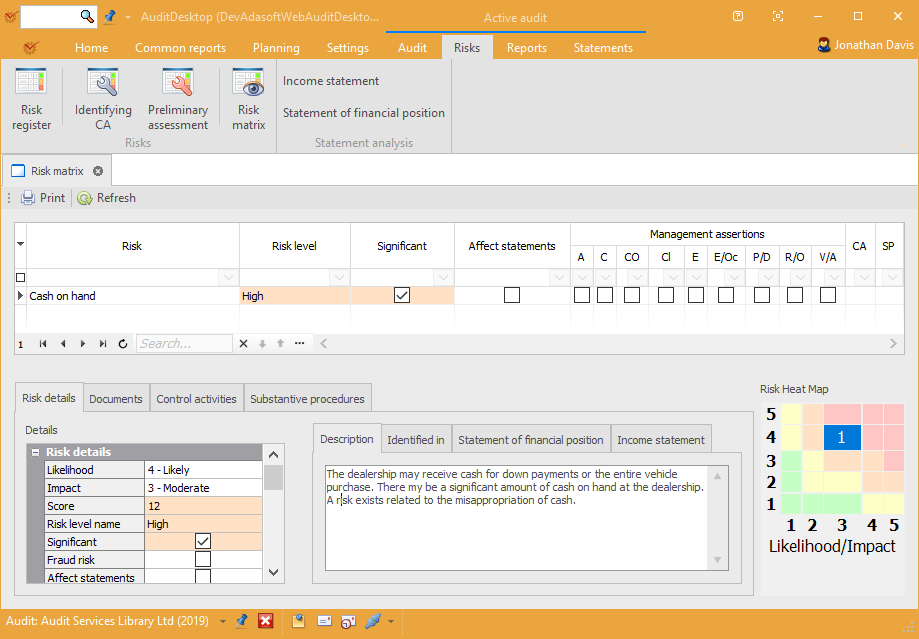
The Risk matrix window shows all identified risks, both covered and
not covered by control activities. To access it, open the Risks
tab and click Risk matrix.
- Print – open the window for preview and printing of
templates where you can print out the
table's data. - Refresh – refresh the data.
Risk matrix
The tab gives information about the risks covered by control activities
and the management assertions connected with
them.
- Risk – the name of the risk
- Risk level – the level of the identified risk
- Significant – whether the risk is significant or not
- Affect statements – whether the risk affects the entire
statement, i.e. all statement items - Management assertions – if the risk is not covered, the
management assertions will be coloured in red. If there is coverage,
they will be coloured in green. - CA – shows the number of control activities
- SP – shows the number of substantive procedures
If you right click on a risk or in the table, you will open a context
menu. It gives access to these actions:
- Add risk – open the window for adding risks
- Edit risk – open the window for editing
risks - **Risk details **– show the risk details (edit function is
inactive)
Risk details
Additional information about the selected risk:
- Details – details about the risk and management assertions
- Description – a short description of the risk
- Identified in – the working paper that
the risk was identified in - Statement of financial position – the Statement of financial
position items affected by
the risk - Income statement – the Income statement
items affected by the risk
Documents
The tab shows all documents that are automatically activated when the
selected risk is marked as Significant.
Control activities
The tab shows details about the control activities that cover the
selected risk:
- Affect statements – whether the control activity covers all
statement items - Control type – what is the control type
- Control component – what is the control component
- Is appropriately planned – assess whether the control activity
was appropriately planned - **Is person suitable **– assess whether the person in charge of the
control activity is suitable - Is implemented – assess whether the control activity is
adequately implemented - Is performed in series – assess the consistency of the control
activity's implementation - Is effective – assess whether the control activity is
effective - Test control – whether the control activity is tested
- Number of tests – the number of control tests (if any)
Substantive procedures
The tab shows the substantive procedures that cover the selected risk.
 Link – add or create a
substantive procedure Remove – remove the
selected substantive procedure
Risk Heat Map
The map shows the likelihood and impact score of the selected risk. The
score is automatically evaluated by the program.