To open the window for the creation of a new audit engagement, choose
one of the following ways:
- Open the Home tab → Click the All
button → Select a client → Click
 New
- Open the Home tab → Click the Clients button → Right
click on a client to open the context menu →
Select New engagement
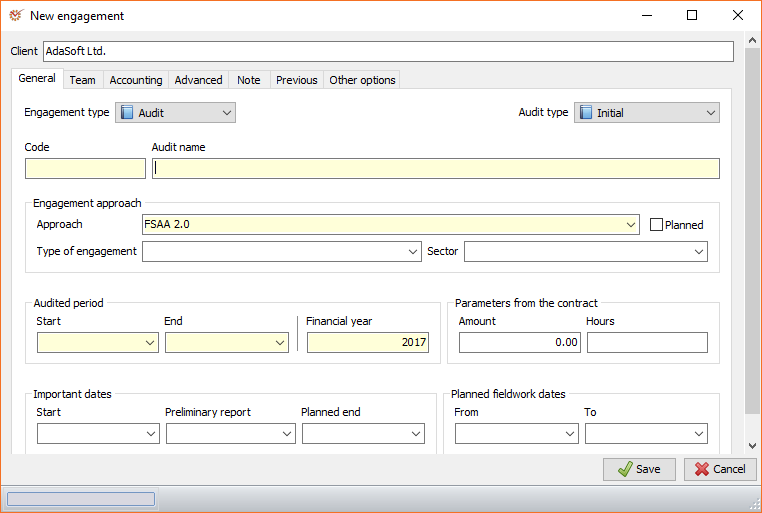
The Client field is filled in automatically and cannot be edited.
There are several obligatory parameters that must be entered when
creating a new engagement. Other parameters are important inasmuch as
they influence the way you work on the engagement; still others are
present for informational purposes only.
To create an engagement you can work on, the following minimal steps
must be performed:
-
Enter the audit name.
-
Select the engagement method.
-
Select the team leader and team members.
This information is sufficient to start a new engagement; all other
parameters can be changed later on. Parameters are grouped into several
sections:
General
Engagement type
The availability of some functions depends on the selected engagement
type. The options are:
- Project - supports basic functionality
- Audit - supports all that is available in Project as well as
additional, audit-specific functions
Audit type
In addition to having informational value, the selected audit type
influences some documents and procedures in the engagement method. The
extent of the impact depends entirely on the manner in which the
selected engagement method is organised. The possible options are:
- Initial
- Subsequent
- Intermediate
- Follow-up
- Other
Tip
The procedure Connection with previous auditor is active only in
Initial audit type.
Code and Audit name
The engagement's code and name help you search more easily for and
recognise the engagement in the list of engagements.
Engagement approach
To create a new engagement, it must have a selected method in the
Library. Once the engagement is created, its method cannot be
changed.
Info
In case you select the Planned engagement option, you will not be
required to select a method, or if you do, the method can be changed
later on. Once the engagement becomes actual, the selected method will
be obligatory and any subsequent change will be impossible.
A planned engagement is an engagement without a selected method. The
engagement can be referred to in Planning, but you cannot work on it.
The following options, which depend on the selected method settings, are
available:
- **Type of engagement
** - **Sector of the economy
**
These options enable you to use one and the same method with different
visibility and accessible working papers, depending on
the selected values.
Tip
The Financial Statement Audit Approach (FSAA) distributed with the
program has different types of engagement set for the audit of Micro
or Small entities and for the audit of Medium or Large
entities. If you select the Micro or
Small entities option, you will be able to view a simplified audit
procedure, whereas if you select the Medium or Large entities
option, you will be able to view the complete set of working papers and
procedures.
Audited period and Parameters from the contract
They are included for informational purposes and are used in document
parametrisation.
Important dates and Planned fieldwork dates
In addition to its informational purpose, the data from these sections
is used when creating the engagement plan. Some of the
tasks' dates can be set as relative, depending on the values of these
parameters.
Team
In this section you can select the engagement team. In order for
employees to have access to a given engagement, they must be part of its
team. All employees who have the right to participate in teams are
displayed in the form of a list, which is set in the
Employees nomenclature. Team members are grouped in up to
four levels:
- Partner
- Manager
- Team leader
- Assistant
Levels 1-3 allow you to mark only one employee per level. When selected,
they become automatically marked as such in the Team members list.
Assistants are added by marking the Member column. If you wish to
give access to an assistant to review the method approach, you must mark
so in the Method column.
Accounting
- Trial balance type - select 1-column Trial
balance or 6-column Trial balance type - Reporting currency - select the currency of the report
- Use Control TB - mark if you want to use the
Control trial balance
Advanced
Parameters specific for Internal audit
The following parameters are specific for conducting an internal audit:
- Annual plan
- Planned hours
- Calendar
- Auditee structure
- From plan
- Audited entity
- Processes
Note
Here you can add a note in plain text connected with the audit
engagement that you are creating.
Previous
You can enter information concerning the previous engagement such as
previous auditor name, previous financial year, etc.
Other options
Dependencies and calculation
- Disable dependencies - deactivates automatic dependencies
concerning the activity/visibility of sections and working papers,
depending on the engagement parameters, selected materiality and
identified risks.
Once you have entered all necessary parameters, click
 Save. Your new
engagement is now created and you can start working on
it.