To make a preliminary assessment of control activities, open the
Risks tab and click the Preliminary assessment button.
 Add – open the window for
adding new control activity Edit – open the window for
editing the control activity Delete – delete the
selected control activity Details – view details
about the control activity (edit function is inactive) Auto edit – go
into edit mode. If you work with large amounts of data, it will save
you time.- Print – open the window for preview and printing of
templates  Refresh – refresh the data
If you right click in the table, you will open a context
menu
that gives access to the actions described above (Auto edit and
Refresh excluded).
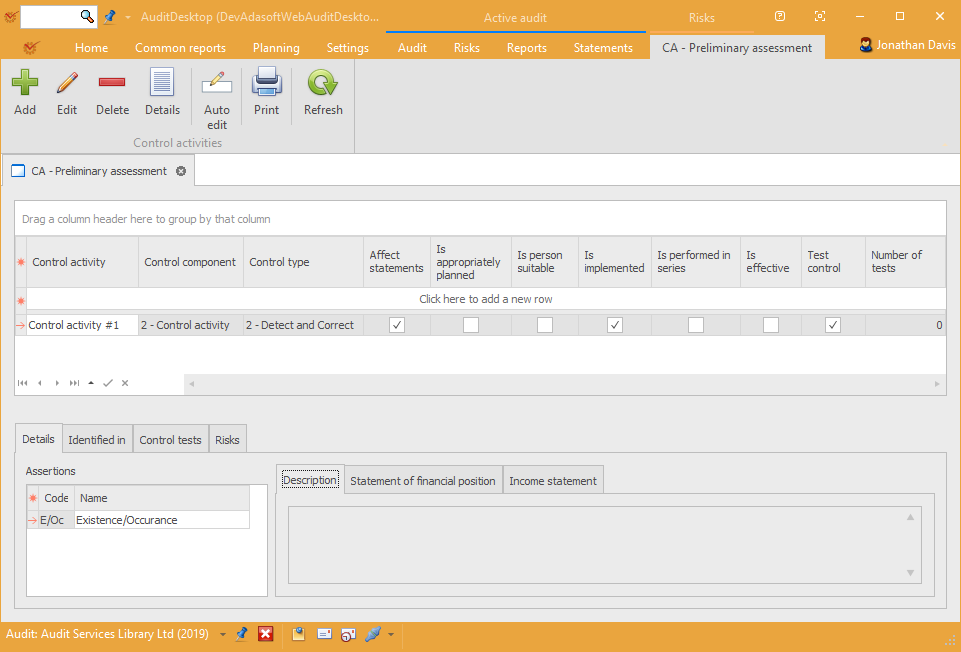
CA – Preliminary assessment
- Control activity – the name of the control activity
- **Control component **– what is the control component
- **Control type **– what is the control type
- Affect statements – whether the control activity affects all
statement items - **Is appropriately planned **– assess whether the control activity
was appropriately planned - Is person suitable – assess whether the person in charge of the
control activity is suitable - Is implemented – assess whether the control activity is
adequately implemented - Is performed in series – assess the consistency of the control
activity's implementation - Is effective – assess whether the control activity is effective
- Test control – mark whether the control activity is tested
- Number of tests – the number of control tests (if any)
Details
-
Assertions – shows the management
assertions that are covered by the control
activity -
Description – a short description of the control activity
-
Statement of financial position – shows the Statement of
financial position items
covered by the control activity -
Income statement – shows the Income statement
items covered by the control activity
Identified in
The tab shows the working paper that the control activity is identified
in.
Control tests
Here you can link control activities with test controls. To do so, click
the  Link button. In the window
that opens, select the test control document or create a new one. If you
haven't linked any test control documents with the control activities,
the value in the Control tests column will remain zero.
If you want to delete a test control, click
 Remove.
Risks
The tab shows information about all risks that are covered by the
selected control activity:
- Likelihood
- Impact
- Score
- Risk level
- Significant
- Fraud risk
- Affect statements
- Affect materiality
- **Description **